Categories
AuShadha Haskell Open Source & Programming

Category Theory Meets Gait Lab (>>=) Learning Haskell Monads


It started with one sentence. I had been teaching myself Haskell for weeks and making real progress — I had wrapped my head around currying and partial application, a milestone in its own right. Then, reading about the concept everyone warned was the final boss of the language – The Monad, I walked straight into this:

A monad is just a monoid in the category of endofunctors, what’s the problem?”

And I stopped. Not paused — stopped. Every word in it was a door into another locked room: monoid, category, endofunctor. Every tutorial I opened tried to pick those locks with even more abstract category theory, or with bizarre analogies about burritos. None of it clicked.

I didn’t need a burrito. I needed the Monad grounded in my reality: the messy, sweat-soaked, packet-dropping world of building a clinical gait-analysis pipeline for my cerebral-palsy clinic. I was building a software to analyse gait in children with cerebral palsy, my latest addition to the AuShadha Project. It was a 15 year dream, full of incremental learnings, stoppages, hurdles… I thought I had not hit another hurdle.

So I threw out the tutorials which were abstract, un-relatable and rebuilt the idea from the only place it ever makes sense to me — the lab floor.

This is Part 1 of a six-part journey. Over the series I’ll trace the Monad from a practical headache (this part), back to its 1950s mathematical origins (Part 2), down into its formal machinery (Parts 3 and 4), and finally through the infamous one-line definition that started this whole obsession (Part 5), before tying off the loose ends of Semigroups and Totality (Part 6).

We start where I started: drowning.


Picture the setup.

A child with cerebral palsy walks on a gait lab path. I’m capturing markerless computer-vision joint angles at 120 frames per second and simultaneously ingesting high-frequency EMG from surface electrodes.

In a perfect, theoretical world, the data flows beautifully. I write a tidy function to calibrate a raw angle by adding a 5-degree offset:

--HASKELL

calibrateAngle :: Float -> Float
calibrateAngle rawAngle = rawAngle + 5.0

Feed it 45.0, get back 50.0. Simple.

But the clinic is not a perfect world. Wires come loose. Sensors drop packets. A parent leans in and occludes the camera. Sometimes I get a reading, and sometimes I get an error, or nothing at all.

Programmatically, this scenario is a nightmare. We have to prepare and programme so defensively, preparing for the edge cases, fear, hope and pray that some edge cases that we had not envisioned before would jump in, cause a runtime error and crash the programme. The traditional imperative programmer would check the scenarios that they can envision and prepare… and hope. This is very not very dependable.

This is the first thought process and fear that Haskell forced me to unlearn: we do not use `null` or None to represent missing data. Instead we use a context — a wrapper or a box or a container. The most common one is Maybe ( There are other containers in Haskell like Either, IO etc .. ). A value sits inside the container. A Maybe Float box can have two values inside it – Nothing or Just. A value of type Maybe Float is a box that is exactly one of two things:

  • Just 45.0 — the sensor worked; here is my wrapped reading.
  • Nothing — the sensor dropped the packet.

And immediately I had a problem.

I couldn’t feed Just 45.0 into calibrateAngle, because that function wants a raw Float, not a Float sealed inside a box. The Haskell compiler will yell at me. I needed a safe way to reach into the box, apply the calibration if the data existed, and put it back — and if the box was empty, just pass the emptiness along without crashing.


That exact problem handed me my first tool: the
Functor.

A Functor is simply any wrapper that lets you map a normal function over the data hidden inside it, using a function called fmap (or its operator <$>).

-- HASKELL

sensorReading :: Maybe Float
sensorReading = Just 45.0
 
calibratedReading = fmap calibrateAngle sensorReading

-- Result: Just 50.0


If the sensor had failed and handed me Nothing , fmap would have safely returned Nothing — no calibration attempted, no null-pointer exception, no crash.

More about fmap and it’s common poorer cousin – the map

It’s worth slowing down on fmap's type signature, because the whole idea is compressed into one line:

fmap :: Functor f => ( a → b ) → f a → f b

Read it aloud: give me a plain function `a → b`, and a value of type `a` wrapped inside some functor `f`, and I’ll hand back the result wrapped in that same `f`. If you’ve written Python or JavaScript, you already know one special case of this — the humble map over a list. The difference is reach. Ordinary map only knows how to walk a list; its type is pinned to one container:

-- HASKELL

map :: (a -> b) -> [a] -> [b] -- lists, and only lists
fmap :: Functor f => (a -> b) -> f a -> f b -- ANY functor

fmap is the same shape with the concrete [] generalized to any container that knows how to be mapped over — Maybe, Either, IO, a tree, even a parser. In fact, for lists the two are literally identical: fmap = map. So map isn’t a rival tool; it’s just fmap with the container hard-coded to a list.

The gait-lab payoff is concrete: the single operator <$> (the infix spelling of fmap) calibrates a reading whether it arrived as a Maybe Float from a flaky IMU, an Either String Float carrying an error reason, or an IO Float straight off the camera. I write the calibration once; fmap makes it run safely inside whichever box the reading happens to be trapped in.

Now, my instinct as a Python programmer screamed the obvious objection.

But why not just use if/else?

My immediate thought was: why can’t I just check the value with an if/else and be done with it? Why invent this whole Wrapper concept?

It comes down to scale and safety. If I use if/else for a multi-stage pipeline — read the sensor, calibrate, smooth, compute flexion — I end up with a nested pyramid that tangles clinical logic together with error-handling plumbing.

And here’s the point: the moment I try to be tidy and abstract that if/else into a reusable helper, I have accidentally reinvented the Functor.

fmap is not magic. It is just the standardized, universal version of the plumbing I was about to write by hand.


In gait analysis I rarely care about one absolute angle; I care about the relative angle between two joints. So I need a function of two arguments — a thigh reading and a shank reading:

-- HASKELL

calculateRelativeAngle :: Float -> Float -> Float
calculateRelativeAngle thighAngle shankAngle = thighAngle - shankAngle

Both readings arrive messy, each in its own Maybe box.

When I tried fmap on just the first sensor, currying bit me: fmap applied the first argument and handed me back a function still waiting for the second argument — and it stuffed that half-applied function back inside a Maybe box. Now I had a wrapped function that needed to be applied to a wrapped value, and plain fmap couldn’t do it.

Enter the Applicative Functor and its operator <*>:

-- HASKELL

finalAngle = calculateRelativeAngle <$> thighSensor <*> shankSensor

-- Result: Just 35.0


Just as the Functor abstracted the if/else for one wrapped value, the Applicative abstracts the nested if/else for many wrapped values. If either sensor drops a packet, the whole chain short-circuits cleanly to Nothing .

A note on order of precedence in Haskell and why fmap does not work in multi-argument scenarios

finalAngle = calculateRelativeAngle <$> thighSensor <*> shankSensor
Why are there no brackets — and what runs first?

That line looks ambiguous ( again that is me, coming from Python and expecting brackets to the right) . It isn’t. Both operators in it — <$> (which is fmap) and <*> — are declared infix : the same precedence level , and left-associative. Same precedence plus left-associative means Haskell groups the line strictly left-to-right, exactly as if I had reached for parentheses myself:

-- HASKELL

finalAngle = (calculateRelativeAngle <$> thighSensor) <*> shankSensor

So the answer to the question on which runs first is : The functor step `<$>` runs first, on the left. It does not run the applicative first and then feed the result into calculateRelativeAngle.

Here is the actual two-step trace, taking thighSensor = Just 50.0 and shankSensor = Just 15.0:

Step 1 — `<$>` (fmap). calculateRelativeAngle takes two arguments, so applying it to only the first leaves a function waiting for the second. fmap puts that inside a box, producing a function trapped inside a Maybe:

HASKELL

calculateRelativeAngle <$> Just 50.0
==> Just (\shank -> 50.0 - shank) :: Maybe (Float -> Float)

That wrapped-up function is the dead-end that made fmap insufficient and forced us to reach for the Applicative in the first place.

Step 2 — `<*>` (Applicative) does the job fmap cannot: it applies a boxed function to a boxed value.

HASKELL

Just (\shank -> 50.0 - shank) <*> Just 15.0
==> Just (50.0 - 15.0) ==> Just 35.0

If either box were Nothing, the whole chain short-circuits to Nothing. Brackets aren’t required because the default left-to-right grouping is already precisely the one we want. (Function application binds tighter than any operator, so calculateRelativeAngle is a finished atom before <$> even looks at it.)

The people who chose these fixities did it deliberately: f <$> x <*> y <*> z is meant to read like an ordinary multi-argument call — left to right, no parentheses. That idiom has a name: applicative style.

I had handled wrapped data and multiple wrapped inputs. The final hurdle — the one that forced me to actually understand Monads — was this: what happens when my own function returns a wrapped value?

I wanted to validate that a computed angle wasn’t biomechanically impossible:

Please note that the function validateBiomechanics takes a Float and gives back a Maybe Float. So we cannot feed out previous data which is a Maybe container into this function as a direct argument. That is where Monadic operation comes in.

We need a way , an operator or tool, that can stand between our Maybe box and validateBiomechanics , take out the value out of the Maybe box , feed it to validateBiomechanics, accept another Maybe result from that, enclose it back in our original Maybe box out of which we took the value out and then since now we have two Maybe boxes, squish it down to just one Maybe box.

-- HASKELL

validateBiomechanics :: Float -> Maybe Float
validateBiomechanics angle =
  if angle >= -10.0 && angle <= 150.0
    then Just angle
    else Nothing
A confusion of Maybe, Nothing, and Just

The Type vs. Constructor Epiphany

For a while I was confused about Maybe, Just, and Nothing — functions promised a Maybe Float but returned a Just or Nothing. The line that unlocked it was the split between the type level and the value level: Maybe is the broad family name that exists only for the compiler; Just and Nothing are the actual shapes of data Maybe can hold. Because the compiler knows the Maybe family has exactly two members, it uses pattern matching to mathematically prove I’ve handled every possible outcome.


Can fmap do it ?

If I fmap this over Just 35.0 , fmap pulls out the 35.0 , feeds it to the function (which returns Just 35.0 ), and dutifully puts that result back in a box — leaving me with Just (Just 35.0) . Boxes inside boxes. I needed a tool that could take a wrapped value, feed it into a function that itself returns a wrapped value, and flatten the result so the boxes don’t stack up.

Please welcome our next tool, after fmap and applicative -- join

That flattening tool is the Monad bind operator , >>= :

-- HASKELL

cleanResult = Just 35.0 >>= validateBiomechanics
-- Result: Just 35.0   (one box, not two)
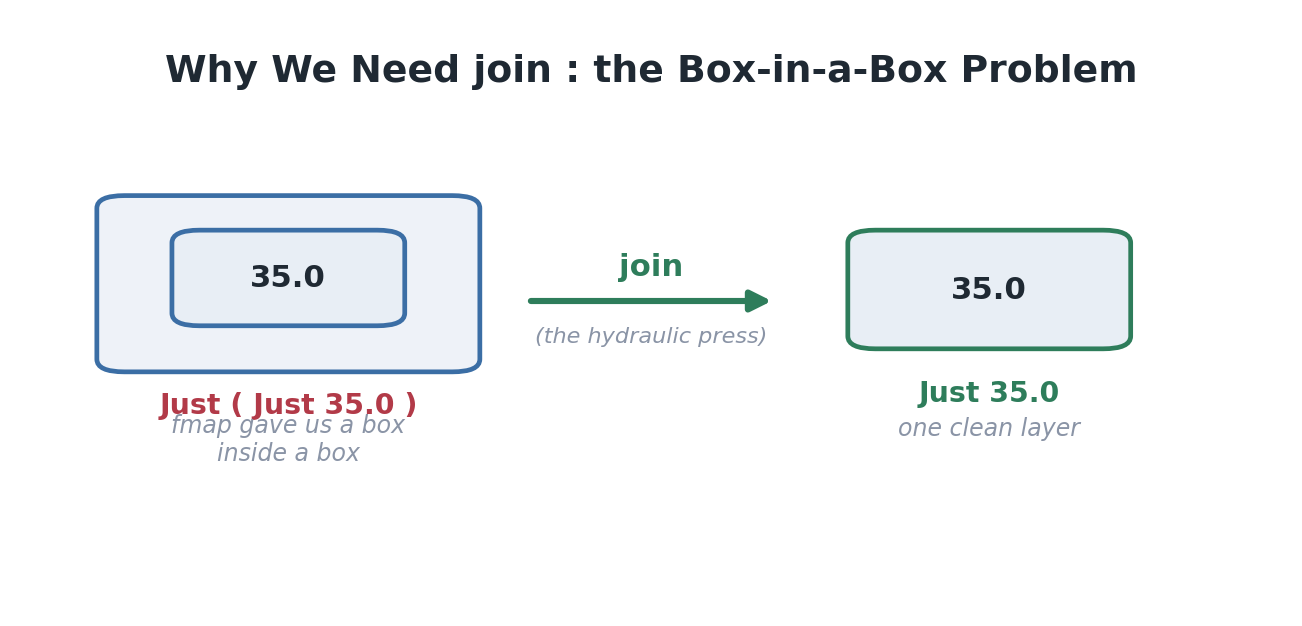
fmap alone leaves nested boxes; the Monad’s job is to flatten them back to one clean layer.


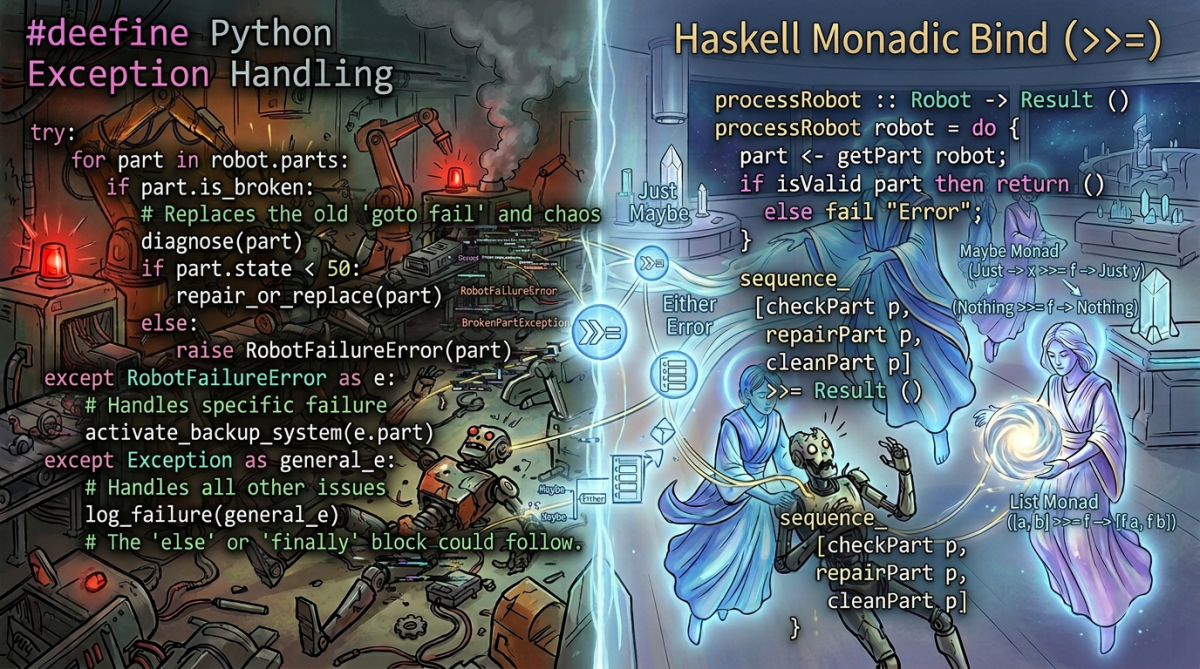
That’s the whole promise of a Monad, at the intuition level. Functor maps into a box. Applicative combines boxes. Monad chains functions that return boxes, flattening as it goes. Three rungs of the same ladder, each handling a strictly harder version of one problem.
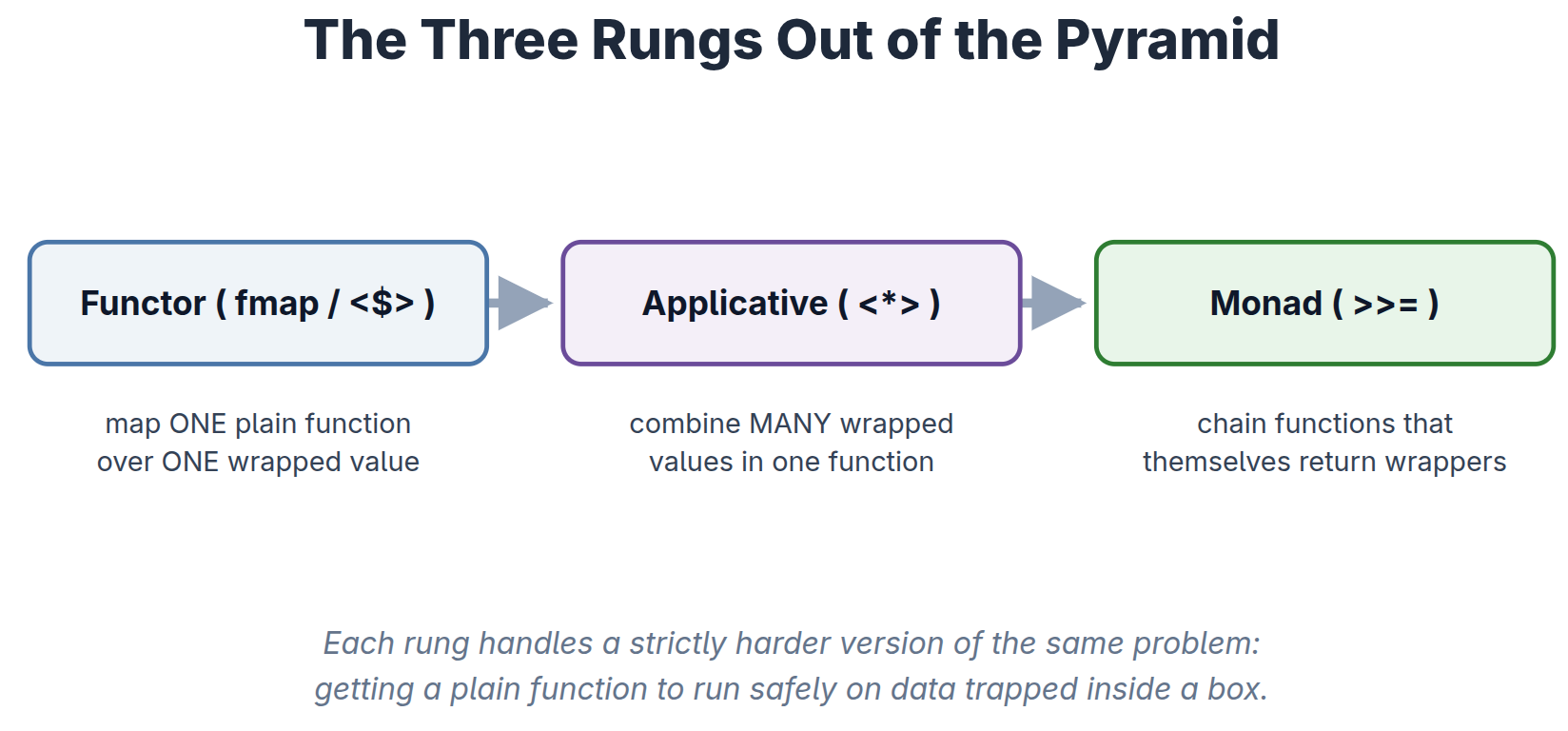

The three rungs out of the pyramid. Each tool solves a harder version of “run a plain function on data trapped in a box.”

Chaining >>= operators by hand gets dense fast. This is exactly the tangled, rightward-marching mess I was trying to escape — the Pyramid of Doom that a Python programmer knows intimately:
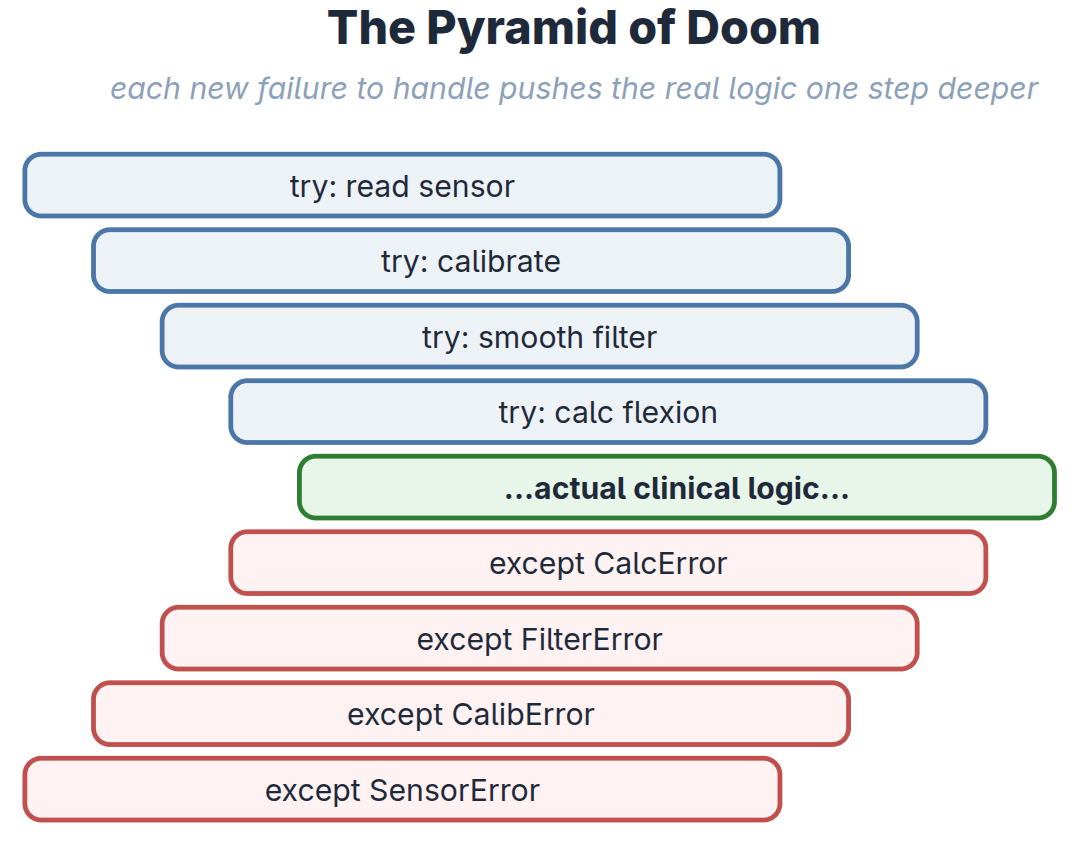
Not convinced ?

Here is the how the full code may look like once functions are chained using >>=

-- HASKELL

processPatientGait :: Maybe Float -> Maybe Float -> Maybe Float
processPatientGait rawThigh rawShank =
  rawThigh >>= (\thigh ->
    rawShank >>= (\shank ->
      let relativeAngle = thigh - shank
      in validateBiomechanics relativeAngle >>= (\validAngle ->
           return validAngle)))


Count the ways it fights you. Three lambdas march off to the right — a Pyramid of Doom rebuilt out of >>= — the clinical logic that actually matters ( thigh - shank ) is buried three indents deep in plumbing, and there’s a tail of )))
you have to balance by hand.

A hidden redundancy the math can spot

Look at the innermost step:
validateBiomechanics relativeAngle >> (\validAngle -> return validAngle) . Feeding a value into >>= only to immediately return it does nothing — by the right-identity law (which we will talk about in Part 3) that whole line is exactly equal to :

validateBiomechanics relativeAngle
on its own. The do block spells out the redundant final step for symmetry; the algebra says you could drop it. Monad laws aren’t decoration — they let you reason about and simplify actual pipeline code.

Every <- in the tidy version is one of these >>= (\x -> …) wrappers: the compiler generates precisely this nested-lambda tower and then mercifully hides it from me. (This is the literally what GHC performs on every do block, – more about this in Part 4)


So here is Haskell’s answer: do notation — syntactic sugar that unwinds that exact tower back into sequential-looking code, while the Monad handles all the failure branching invisibly underneath:

-- HASKELL

processPatientGait :: Maybe Float -> Maybe Float -> Maybe Float
processPatientGait rawThigh rawShank = do
  thigh      <- rawThigh
  shank      <- rawShank
  let relativeAngle = thigh - shank
  validAngle <- validateBiomechanics relativeAngle
  return validAngle

This unlocked several “aha” moments at once:

  • The `<-` operator is just >>= in disguise. It extracts the value from the box; if the box is empty, the whole block instantly aborts to Nothing.
  • `<-` versus `let`. I use <- to unpack monadic boxes, and let for plain, unwrapped math.
  • `return` is a trap for anyone coming from Python or C. It does not stop execution. It is just an ordinary function whose only job is to take a pure value and drop it into a default box. (We will speak about return again, maybe, in Part 3. Pun intended 😉 )


Maybe can only say that something failed, never why. In a clinical setting, “it failed” is not an acceptable log line. So I upgraded to the `Either` Monad, which lets me carry the reason for failure alongside the failure itself:

-- HASKELL

validateVision :: Float -> Float -> Either String Float
validateVision angle confidence =
  if confidence > 0.85
    then Right angle
    else Left "Vision Error: Patient occluded."

Chained inside a do block, my pure math pipeline stays flawless: if the camera glitches, it returns a specific, human-readable error string instead of a crash. (This idea — a function that has a legal answer for every possible input, including failure — has a name, Totality, and it will be discussed probably in part 6)

But pure logic alone does nothing; a program with no side effects just warms up the CPU as many Haskellers proudly say. To actually touch the hardware and do something useful like announcing to the user on the monitor as an output and printing characters, I reach for the `IO` Monad, which quarantines the messy real-world boundary :

-- HASKELL

runGaitAnalysis :: IO ()
runGaitAnalysis = do
  putStrLn "Starting patient gait analysis..."
  rawAngle <- readCameraFeed            -- messy IO boundary
  visConf  <- readCameraFeedConfidence  -- messy IO boundary
  let result = calculateMuscleForce rawAngle visConf   -- pure math
  case result of
    Left err -> putStrLn ("FAILED: "  ++ err)
    Right f  -> putStrLn ("SUCCESS: " ++ show f)

And there it was. The Monad wasn’t a mystical entity or an internet punchline. It was the universal adapter that let me build one elegant, predictable pipeline — managing missing data, tracking clinical errors, and safely touching physical hardware — without a single line of spaghetti.

That’s the intuition. But intuition left me with a nagging question: where did this idea come from, and why did a purely functional language need rescuing by a piece of 1950s abstract algebra in the first place? In Part 2, I trace the Monad’s improbable journey from a mathematician’s chalkboard to my clinic’s compiler.

Categories
General Linux Open Source & Programming Others Python

MedTatva : Tool to screen for #COVID19


We are all going through a tough time with #COVID19 #Epidemic. It has been a testing time for doctors, public and administrators alike. The poor have been hit badly and are under threat as the epidemic is still spreading in various countries as we speak. Access to healthcare, paying capacity, travel are all issues that the citizens of various demographics have to confront.

We at MedTatva [ https://medtatva.com ], have been trying to solve accessibility to healthcare and diagnostic tools by using technology.

Past few days we have put together the best recommendations from CDC and WHO to build a symptom checker that is simple and which could be completed in less than a minute by a non-medical person.

Please find the screening tool here : https://medtatva.com/coronavirus/home

Categories
Art and Paintings Cerebral-palsy Open Source & Programming Orthopedics Pediatric Orthopedics

Tribute to the Eternal Mother ❤️ – Digital #Art of Cerebral Palsy


Cerebral Palsy is such a difficult disease to handle and treat for the health care professionals.

The treatment process needs to take the parents and family members along so that these children get optimal care. It’s important to reinforce on the parents and lift their morale throughout the course of long and arduous treatment.

I routinely arrange seminars and medical camps and arrange public events in association with groups serving these children to help them and keep caregiver morale high. It’s a fight, a relentless fight against Cerebral Palsy.

It never ceases to amaze and move me that the mother , however humble or rich , illiterate or well educated, they may be cares for the child and stays with child through thick and thin.

Wacom One CTL and MyPaint on Linux works like it’s a match made in heaven.

My Digital Art on a mother caring for her child with Cerebral Palsy – Drawn using Wacom One CTL 472 and MyPaint Open Source Software.

This painting is part of the #ArztForACause fundraiser for children with Cerebral Palsy , Autism and Movement Disorders

She literally is the guiding light of the treatment, showing the way and proving that she’s the true representative of the all giving , ever loving Divine Mother

Cerebral Palsy - Digital Art
A Mother leading and lighting the way of care for her child with Cerebral Palsy – Digital #Art
Categories
AuShadha EMR Open Source & Programming Python

#PySangamam presentation on #AuShadha done !


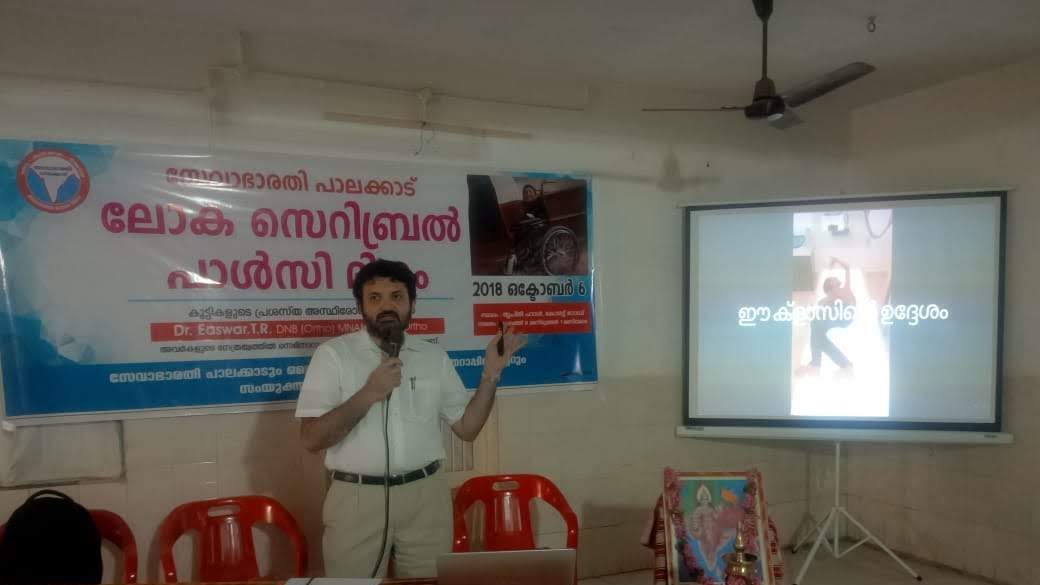
Had a lovely day at @PySangamam where I presented my experiences developing @aushadha_emr #ElectronicMedicalRecords or #EMR . Attaching below are some pictures of the event. https://t.co/hJteYzw822

I was pleasantly surprised on how open the crowd and organisers were to a talk delivered by a developer who’s primarily a doctor. It was organised beautifully and thanks specially Mr. Vijayakumar , Mr Abhishek and his team for all the encouragement.

Looking forward to #pysangamam next year at #Coimbatore , my home town

My Presentation : Creating Pluggable Electronic Medical Records

Git Hub : AuShadha Open Source Electronic Medical Records 

https://www.linkedin.com/feed/update/urn:li:activity:6443989732329394176

Categories
AuShadha EMR Linux Open Source & Programming Python

AuShadha 2.0 , a re-write of AuShadha Electronic Medical Records


I am happy to inform as promised earlier that AuShadha 2.0, which is a complete rewrite of AuShadha using Python 3.x, PostreSQL, Django 2.x and Dojo1.1x has been started and first major commit pushed.

Please find the repository at https://github.com/dreaswar/AuShadha2.0 

AuShadha 2.0 will use GNU-GPL Version 3.0 License.

Categories
AuShadha EMR Open Source & Programming Python

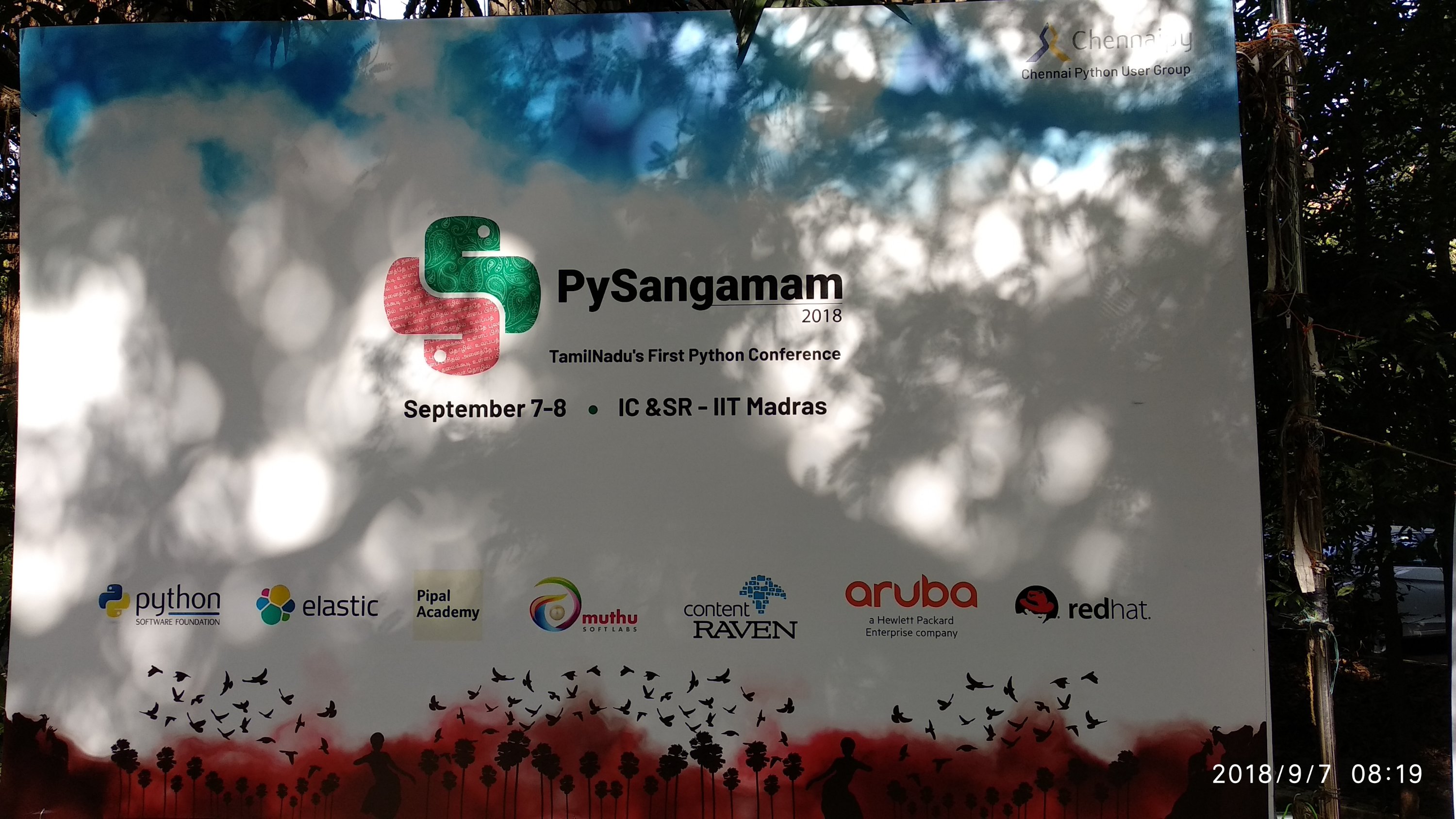
PySangamam , the first Python Conference at Tamil Nadu


I’m excited to participate at #PySangamam the first Python Conference in Tamil Nadu at chennai Next month to talk on AuShadha EMR

via #Townscript https://t.co/xipWgkYQDF via @townscript
#Python
#Django
#webdevelopment
@aushadha_emr

Categories
AuShadha EMR Open Source & Programming Python

AuShadha Electronic Medical Records Development update


AuShadha Electronic Medical Records at https://github.com/dreaswar/AuShadha has been seeing very slow development mostly due to pressures on my personal and professional front.

I could get back to development past few days and I have pushed a commit to master after some gap.

The Prescription App for Outpatient visits is ready.

Next stop is to implement Outpatient Reports.

Do check it out and let me know what you think.

You will need #Django1.7.2, #Python2.7x, #Dojo #Javascript Toolkit 1.13

Categories
General Linux Open Source & Programming Pediatric Orthopedics

Making Media rich Medical Presentations using Emacs, Org-mode and Reveal.js – Part 1


Scenario

As a practicing Paediatric Orthopaedic Surgeon, I am called to meeting to present my work. This involves presenting to peers, co-workers, patients and parents of children I care for. Each of these presentations will be with a different focus on a particular topic. 

While this is not an uncommon scenario, the solution to create a reusable presentation slides using #OpenSourceSoftware tailored to individual audience is. Most doctors are not familiar with programming environment  and shy away from anything that is not WYSIWYG. They rely on good old #PowerPoint / #Keynote to save them. At the most some of them may try and use the clunkly #LibreOffice or #OpenOffice if they want to stick to OpenSource. Recently with advent of tools like Prezi, media heavy interactive presentations have become popular. The popular presentation softwares of KeyNote, PowerPoint have also spruced up their animations and transitions to enable them to look more attractive. Still the WYSIWYG nature of these and point-and-click makes them very slow. We could achieve better, faster and more attractive results with using #FOSS tools. 


What I use now

For the past few years I’ve been using a combo of 

  1. #LaTeX via #beamer class 
  2. #RevealJS ,
  3. #Emacs, Org-Mode, org-reveal
  4. #HTML5 and #CSS3
  5. FOSS Image and Video editing softwares as required to arrange the media. I mainly use GIMP, InkScape, KdenLive, OpenShot, HandBrake to arrange my media and encode them. 

My choice depends on the demands of the presentation. 

For media heavy, especially video heavy presentations I use RevealJS. For presentations that are more of less static with few videos I tend to use Beamer / LaTeX. What I note below are my experiences as I tried to create a smooth workflow that could replace PowerPoint ( or KeyNote / LibreOffice ) as a tool to create #Medical Presentations. 

Overtime I have refined my workflow and now I find that I am far more productive and my slides can pack much more information than a power point slide. While the more advanced interactions would require some knowledge of JavaScript, and therefore would turn off most doctors, most of what follows require minimal programming use. 

I will detail my workflow to create simple fast layout using Emacs and RevealJS without handcoding of JS and HTML. We will be relying on the RevealJS, Emacs, Org-Mode and ox-reveal package to do the lifting. 


Disclaimer : Even though it doesn’t need programming knowledge, ability to use Emacs is a must for this workflow. It is preferable that one is on a Linux OS as the attempt is to go all #FOSS here. 


so, here goes ….


Aim

To create an visually impressive medical presentation using non Power Point open source (FOSS) softwares.

Tools

  1. Emacs (24.3 or greater)
  2. org-mode
  3. org-reveal
  4. Reveal.js
  5. Chrome Browser
  6. Open source video codecs on the system

Why this and not PowerPoint ?

Over the years Medical Conference presentations have got mature and old tools have got boring. Varied audiences, topics, media content , interactivity required, transitions and animations to keep audiences interested have all changed.

PowerPoint with it’s traditional set of tools is boring to say the least. The point and click interface is slow by comparison to plain text typing. This seems counter intuitive to PowerPoint pandits but I’ve found that once the media is arranged and readied, once can create more far more attractive presentations with the tools mentioned above. 

As far as medical presentations go, the video presentations embedded PowerPoint / LibreOffice have a habit of breaking on stage. I have seen numerous instances of this happening.

And, of course PowerPoint costs 💰💰

It is also Closed Source making it difficult to edit and reproduce when you are with a system where it is not installed.


Okay, but why Emacs, why indeed ?

Emacs is Open Source

Emacs is stable

Emacs is good

Emacs is better than #Vim

Emacs has un-paralleled number of extensions and programming support

Emacs has Org-mode… 


Okay, So why org-mode, what has that got to do with presentations ?

org-mode is cool

org-mode is simple text

org-mode can be manipulated anywhere with text-editor

Its FOSS

It can be extended with other tools like org-reveal


Hm, Okay, but why Reveal.js ?

An actively developed FOSS Tool with a community

Allows 2D stacking of slides permitting nesting

Plugins and all the JS/CSS/HTML5 goodies can be integrated

Very good slider-presenter notes

PDF export option for handouts

Very nice transitions and animations

Good builtin themes and literally infinite customisation options as per CSS

Works very well with slide-projectors and remote tools to advance slides


Okay, but why use org-mode / org-reveal with Reveal.js ?

Org-mode is cool, easy, transparent text typing

org-mode is structured and nested just like a regular presentations would be

One can easily do a text-only sketch of a presentations by typing out a few lines of text in org–mode formatting and out put a neatly animated stacked presentation in Reveal.js

If one were to code HTML and JS with Reveal.js, it would be considerably opaque, with HTML markup and JS obscuring the structural details of the presentation.

By integrating org-mode, org-reveal and reveal.js we are integrating all that is good in respective tools while sticking to what the non-programmer user ( an average medical professional ) would like to do – type text and structure the presentation.


So, How to go about making one ?

Part 1 : Preparing the ground

Step 1 :

Install GNU-Emacs > 24.3


Step 2 :

Update package-archives and use Melpa archive.

Update org-mode.


Step 3 :

Install ox-reveal package


Step 4 :

‘require(ox-reveal) in your .emacs file


Step 5 :

Download and keep the Reveal.js file in a folder.

Note down the path to the folder relative to the folder where the presentation will live.

If you have Bower installed you can just do bower install revealjs


Step 6 :

Create a folder where your presentation will live. 

Inside the folder create subfolders for Images, Videos, Scripts, CSS styles and other documents which may be needed for the presentation. 

Now we can create the main file of the presentation – the Org-mode file using Emacs.  Org-mode file is a simple text file which can be opened using any other text-editor. It has the extension of  “.org”

While using Emacs and Org-Mode, however, it provides lot of goodies. Org-Mode in Emacs has lot of extensions one can install that extends it functionality. One can for example use the same org-mode file to output HTML, LaTeX, and PDF. 

So let us create the main presentation file. I title my presentations the following way, giving it context, separated by underscores : <topic>_<audience>_<date>_<venue> . For example if I am giving a public talk on Cerebral Palsy at my home town of Palakkad, on July 30th,2019 , I would title my presentation like this : “CerebralPalsy_PublicTalk_Palakkad_30072019.org”

This allows me to keep separate org-mode files for different audience and keep using the same images, videos etc.. Therefore I am fully portable and self-contained when I have to whip up a presentation tailored to any particular audience – technical or non-technical. 

C-x C-f  in Emacs  to the file you want to create with .org extension.

C-C C-# to insert Template for a Reveal.JS presentation.

If you have ‘ox-reveal loaded it should be available as a choice.

Once chosen it will list some options at the top of the org-mode file.

We will need to provide the path to the REVEAL_ROOT directory to the place we have stored the reveal.js library. This path is relative to the folder where the file for presentation lives. 

Once these are done, It is important to get the images, videos ready. They have to be edited using FOSS tools for editing photos and videos. Once edited they’ve to be named properly so that we can reference them in our presentations. 


This completes the ground work required to start writing the presentation. While this may seem a lot of work, one must remember this is one time effort.

We will deal with the actual creation of  org-mode file, the options while using Reveal.JS in the next part ….

Categories
AuShadha EMR Open Source & Programming

AuShadha2.0


For all those who were following AuShadha Open Source EMR project hosted at GitHub there’s news. 

I had paused developing for sometime due to pressure of time. 

The development has restarted for past few months (no commits ) and am planning to branch of development into AuShadha2.0 with changes to the core, Dojo 1.12 JavaScript library, Django1.10 support and Python3.x support. 

This is a version written with lessons of what were not ideal practices in previous version. 

Watch this space. Will post more by the end of this month. 

Categories
AuShadha EMR Open Source & Programming

Developing Pluggable Modules for AuShadha – Tutorial – PART 1


AuShadha Open Source EMR has been made pluggable – well almost. The au_pluggable branch is meant to make it more pluggable that it was in master branch.

Issues the monolithic AuShadha:

Well, when I started this I myself was new to Django and programming in general. I learnt as I coded and as can be expected, there were code everywhere and it was not very pleasant. So I rewrote the app in many times from ground up before AuShadha came into being. I was at that time building something for myself – to use at my orthopaedic clinic.

When AuShadha was started, it suddenly dawned that there are now people participating; people who have never seen this code, and who probably will be put off on the huge pile of code to digest. Since there is already a lot of code out there, it is difficult for a developer joining a project or someone who does not want the whole AuShadha package to develop , rehash or add packages to it. The entry barrier was very high. I also seemed to be re-creating one of the problems that made me start and EMR project; I had found existing ones tough to customise.

In an ideal world, EMRs should vary. Data collection varies from hospital to hospital, country to country and speciality to speciality and to some extent practioner to practitioner. Except for gross repeatable elements that can be swapped, most of the EMRs have to be different. However, many are not. Its not common in India to see EMRs used by hospitals that do not fit into the Indian way of data gathering and its unique Demographics and other regional specifics. Some EMRs do provide custom form generation to tide over this and some vendors do provide some basic customisation. The solution has to be more robust.

My own experience with getting them to do that for us was poor. This is probably because the code is hardwired and they could not accomodate out request for a feature change easily. From their side it would involve extensive recoding and debugging, man power requirement, that could not be afforded when the system is live at a Hospital.

The user should be provided a decent package out of the box with the option of switching out elements as he / she sees fit, to develop his own variant of AuShadha. This would be the ultimate goal.

Why this tutorial ?

It became quickly clear that I had to do something about it before the project grew. So about 2 months ago I created the au_pluggable branch in an attempt to modularise AuShadha. Thankfully Django encourages pluggable modules. This process was not very difficult; except for the difficulties created by my mangled coding earlier 🙂

The purpose of the write-up is to show developers and other enthusiastic people who want to develop / test out AuShadha how easy it is now to create their own mix- and – match AuShadha brew. There is still a lot of work, but as it stands the process is simple enough for somebody to follow. It is intended to show how easy it is to create modules for AuShadha without knowing the whole codebase that is already out there.

The tutorial would be written in parts. This is the first one.

So, let us start.

As I said, one of the advantages of the current pluggability model it that it allows user to swap in custom implementation of a particular module. All this while retaining the inherent structure of Django. This is important as developers who would get involved with AuShadha should feel that the skill they improve here is usable outside of AuShadha. Therefore the customisations have be done on top of Django with no patching of Django or any hacks.

First, let us familiarise ourselves with AuShadha module directory and file structure. After that we will create a pluggable module for use. For example, if the user wants his own implementation of the Demographics module overriding the stock version he / she will do it as below. The procedure for creating new modules will also be identical to this, which will be examined in subsequent post.

Of course if the reader dosent care and just wants to build a pluggable module for AuShadha using raw Django, then there is not problem. He can just build a regular Django-app and intergrate it as usual and expect it to work; well, after some little configuration. No XML I promise.

Basic AuShadha-app structure

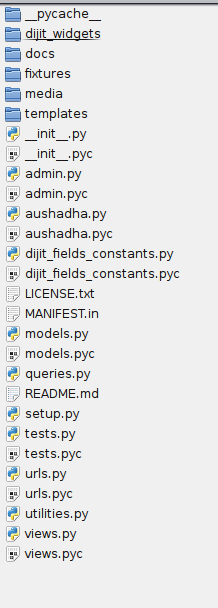
The basic Structure of an AuShadha-pluggable module is typically seen in the patient app ( called aushadha-patient )

patient/
|– admin.py
|– aushadha.py
|– dijit_fields_constants.py
|– dijit_widgets
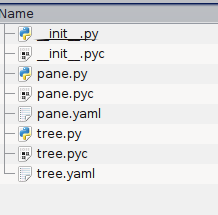
| |– __init__.py
| |– pane.py
| |– pane.yaml
| |– tree.py
| `– tree.yaml
|– docs
|– fixtures
|– __init__.py
|– LICENSE.txt
|– MANIFEST.in
|– media
| |–patient
| | |– images
| | |– js
| | |– styles
| `– README
|– models.py
|– queries.py
|– README.md
|– setup.py
|– templates
| `– patient_detail
| |– add.html
| |– edit.html
| |– info.html
| |– list.html
| |– summary.html
|– tests.py
|– urls.py
|– utilities.py
|– views.py

Typical AuShadha Application Structure and its contents

models.py, views.py, urls.py, admin.py, media/, templates/ are directly from Django’s own system. Nothing much custom here. Standard Django roles are served by these files.

Custom action is mostly in dijit_widgets/ and its contents, dijit_fields_constants.py, aushadha.py, queries.py, utilities.py

AuShadha uses a system of PyYAML to serialize and generate the UI for each app. Each app can configure the UI layout using Dijit (Dojo) widgets using this markup. Whats’ wrong with HTML ? Well, this is way more readable, we can still use the goodness of Django’s template engine and PyYAML’s python object and function calls including pickling and this reduces the JS files. This way there is less to debug and quick prototyping and customisation of UI is possible. The dijit_widgets folder contains:

Folder Structure and contents inside dijit_widgets folder

pane.py, pane.yaml — > Django view to serve the ‘pane’ for the app. All customisation can be done in the corresponding pane.yaml using django template syntax / PyYaml syntax. It will be serialized as JSON and presented on request. This JSON will autocreate the UI. It is much more easier than using HTML with Django template for UI generation. Of course this traditional approach can be used just to generate Django forms and its validation JS code. This is what is done in the templates/ folder.

tree.py, tree.yaml — > Though not necessary for all apps, apps that do provide a tree structure to the UI can define this and use tree.yaml to generate the structure dynamically. Django template can be used as can PyYAML object notations. The JSON can then be passed to the client on request.

dijit_fields_constants.py — > (WARINING: This is going to be changed soon ) This hold the Python dictionary values for model form fields as Django ModelForm using Dojo/Dijit markup. This was before YAML became widely used in the project. This will be replaced soon with PyYAML markup like the Ui and this file may be moved into the dijit_widgets directory.

aushadha.py –> Every project when server is started creates a shared instance of AuShadhaUI class that lives in . This instance accepts registration of classes for particular roles they will perform in the EMR. Registration for the role and the class is done here. Each module is autoinspected for aushadha.py file on server startup just like admin.py file. The purpose for this is to create a role based central registry that registers classes for roles in EMR. This allow relative role based imports rather than path based module dependant imports allowing free module swappability. No more ImportErrors if that particular module is not present. For eg; if the patient module has been changed by say Author Mr. X and he has named it patient-mr-x and included in installed apps, along with a registration in aushadha.py for “PatientRegistration” role, as long as syncdb has been done, the class is picked up on first load and registered for that role overwriting the stock ‘patient’ app. All modules that need ‘patient_detail’ foreignkey do a relative import of the same in their models.py / views.py. This allows a Zope 3 like Interface like, Role based registrations allowing loose coupling. This is explained by me in my query to Stack Overflow here. Sadly, no answers came. So this solution has been rolled out. http://stackoverflow.com/questions/19100013/using-zope-interface-with-django

LICENSE.txt, MANIFEST.in, README.md, setup.py, docs/ are requirements to make this a python package. This will allow users to easing installation.

Having described the directory structure of AuShadha app and its contents, we will discuss the app creation from scratch in next part of the tutorial

Categories
AuShadha

AuShadha Open Source EMR screenshots


Latest screenshots of AuShadha Open Source EMR at http://blog.aushadha.org/?p=27

Categories
AuShadha

AuShadha Open Source EMR moves to Django 1.5.1


AuShadha Dependency Changes:
========================

This is to infrom that AuShadha dependency list has changed. This has been necessitated to ensure compatibility with Django 1.5.1 and xhtml2pdf.pisa packages along with upgrades to ReportLab, PIL, South.

Anybody wanting to test out code in the “visit_experimental” branch need to setup a Python virtualenv and run the following from the AuShadha code main directory

Read more about it here… http://blog.aushadha.org/?p=24

Categories
AuShadha EMR Linux Open Source & Programming Python

ICD 10 CM Diagnosis Code parser in Python for AuShadha Electronic Medical Records Project


AuShadha Logo
AuShadha Logo

AuShadha Open Source Electronic Medical Records Project Update:

AuShadha is an electronic medical records project in Python, Django and Dojo.
AuShadha is getting ICD 10 Ready….  Just building an XML parser using elementtree module to parse the ICD 10 codes into a DB.

Know more about AuShadha at: http://facebook.com/AuShadha

Live Demo at : http://tinyurl.com/byaorgq

Dr.Easwar
http://www.dreaswar.com/

Categories
AuShadha EMR Linux Open Source & Programming Python

Hosted Live Demo for AuShadha Open Source Electronic Medical Records Project


AuShadha Logo
AuShadha Logo

Hosted Live Demo for AuShadha Electronic Medical Records Project

Finally my Open Source Electronic Medical Records using Django, Python, and Dojo has a hosted Live Demo.

This features the ‘master’ branch from Github.
Issues:

  • Initial screen load takes some times with un-styled display.
  • This will be fixed later.
  • Please take it as a prototype and explore and let me know.
  • Physical Examinations and Admissions management has not been integrated, will do it soon

Login as below:

username : demo_user
password : demopassword

URL:  http://powerful-earth-4121.herokuapp.com/AuShadha/alternate_layout/
Please leave your comments here.

Thanks,

Dr. Easwar T.R
http://www.dreaswar.com/

Categories
AuShadha EMR Open Source & Programming Python

AuShadha Open Source Electronic Medical Records Project : Version 1 at the Horizon


AuShadha Open Source Electronic Medical Records project is coming along nicely.

This has been done in Python, Django and Dojo.

The project introduction is here

This is an update to AuShadha on the walk up to Version 1

I am rather busy lately which is why there has not been a post on this; its been quiet for a while, a little longer than I would have liked. The project though, has been far from quiet. Several Improvements both in UI and the back-end has been done and is continuing in a walk up to Version 1 vision put down in the Github Wiki Roadmap.

The gallery below is some samples of the improvements that have come along. These would not have been possible without the help of Dr. Richard Kim, whose constant advice , criticisms helped shape this and continues to do so. Developers involved with the project has been credited and integrated into the UI.

Predominantly the focus is on a balance between minimalism and functionality. It is known that minimalism is beautiful, but in a non-linear system like EMR the issue is that there may not be a workflow to speak off. People often need to random things at various times and expect the UI to keep things within reach. Initially I was not convinced about this, and my focus was more on workflow. Richard convinced me about this and now I see the light. However, my attraction towards minimalism has not been totally abandoned and try to achieve a balance.

As we see version 1 at the horizon, it will be nice to have your feedback. Do leave your comments and criticisms here.

Head over to Github , grab the code and let me know.

Categories
AuShadha EMR Open Source & Programming

Formatting Dojo Datagrid with values from many fields


How to Format a Dojo Datagrid with values from different fields: This is an post outlining this approach.

Ram Kola's avatarDocumentum Cookbook

I faced an interesting problem today. I was using a dojo Datagrid and wanted to display a different value in “Author” column if the author value was empty. All the samples I came across on the net were simple formatter examples which dealt with a single column.
Finally I found that the formatter function call has an “undocumented” 2nd argument “rowIndex”. Once I had a handle to this rowIndex, I could retrieve all the fields in the grid row using var rowdata = this.grid.getItem(rowIndex).

var layout = [{
field: “a_content_type”,
name: ‘ ‘,
width: “20px”,
formatter: getIcon
},
{
field: “author”,
name: ‘Author‘,
width: “25%”,
styles: ‘text-decoration:underline;’,
formatter: getAuthor
},……

//You can name the arguments anyway you want.
//You can call this function getAuthor(writer, rowNum), Javascript will pass the values to your arguments when formatter is called.
function getAuthor(author, rowIndex){
if( dojo.string.trim(author) == “”) { //author field was…

View original post 27 more words

Categories
AuShadha EMR Open Source & Programming Python

War of the Python EMRs Starts this week at my Hospital – GNUmed v/s GNUHealth


My Hospital has requested me to install Electronic Medical Records (EMR).

We are planning, as always, an Open Source Based EMR Solution.

I have desisted from offering my Open Source Electronic Medical Records -AuShadha as one of the options as its still in heavy development.Therefore I have advised two Open Source Implementations that I have short listed after scouring all the available choices that are listed in Wikipedia and Medfloss.

While some of the implementations are not in active development, others are not specifically meant for private clinics like ours. They are for developing nations to keep track of communicable diseases and other specific diseases and treatments. While it is possible to adopt and modify them , there are two Open Source EMR implementations that are reasonably good straight out of the box.

1) GNUmed

2) GNU Health

Why did I choose them ?

I have to implement and maintain them. I know Python. They are in Python.

Implementation should be easier and so will the maintenance.

Tweaking them to closely fit our hospital’s work flow and adding specific forms for data collection and research work should also be possible.

I personally tend to favour GNU Health, because of installation woes on GNUmed’s previous versions and what I thought was a complicated UI layout but recent communications with Mr. Stephen Hilbert and Mr. Karsten Hilbert, developers of GNUmed and an India doctor who uses GNUmed have forced me to take a second longer look.

This week then I will be installing both on our servers and opening it for use by doctors at our hospital for a month. The user friendliness and ‘tweakability’ will be assessed and then we will decide a month later on which to choose.
Keeping fingers crossed. Will give Installation reports, issues, user experience here once it is through.

Categories
AuShadha EMR Open Source & Programming Python

AuShadha EMR Project listed at Medfloss website !


AuShadha EMR Project gets listed at Medfloss website

http://www.medfloss.org/node/806

Thanks Medfloss for the help in listing the Project !

http://www.medfloss.org/node/806
AuShadha Project is listed at Medfloss at http://www.medfloss.org/node/806

Categories
AuShadha EMR Open Source & Programming Python

AuShadha UI is about to get a design make over – A Preview Mockup


AuShadha is undergoing a UI desgin makeover to fit into the present role. I had Open sourced my private EMR, so essentially I am stripping it of personal features and adding in the common use ones that will serve for a multiuser clinic.

Dojo 1.8 migration has already started and is currently in testing.

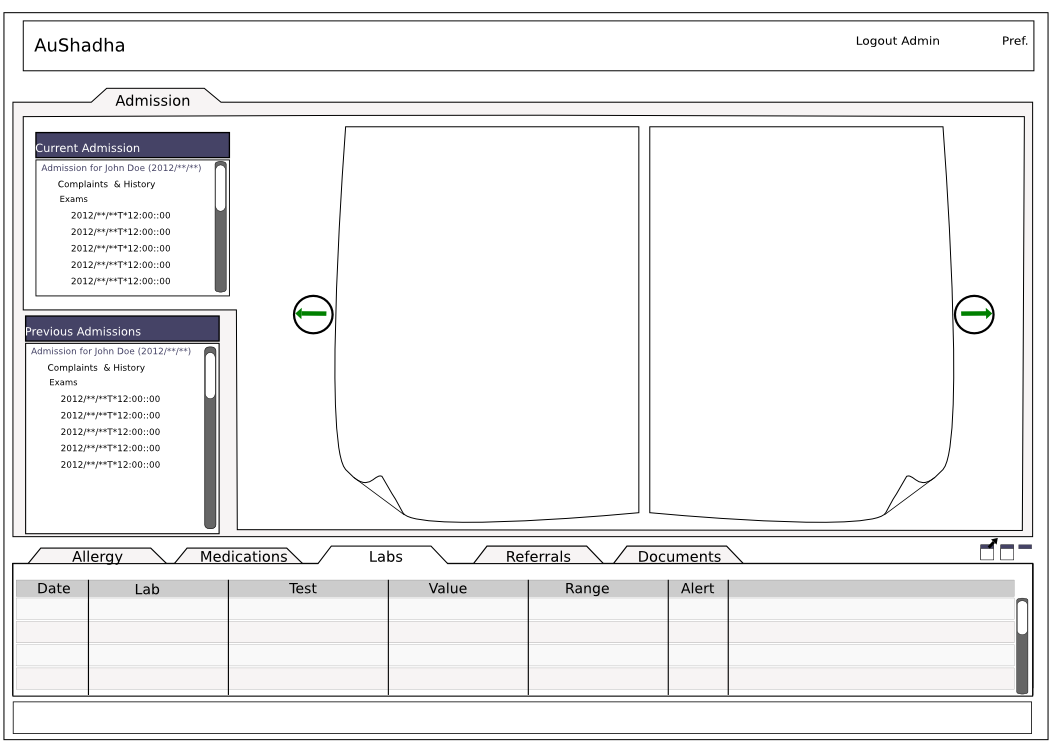
UI design for the pane controlling an admitted patient is as below. This is a mock up in inkscape and is likely to change.

Once the UI is finalised and Dojo 1.8 is tested locally, I will push it to github repo at http://dreaswar.github.com/AuShadha/

Please watch this space and http://facebook.com/AuShadha for further news on the project


AuShadha UI Mockup
AuShadha EMR project UI mock up

Categories
EMR Open Source & Programming Python

AuShadha Open Source Public Health Management EMR System at GitHub has a official logo


Image Image

LICENSE: Image

Creative Commons Attribution-NonCommercial-NoDerivs 3.0 Unported License

AuShadha Project home: http://dreaswar.github.com/AuShadha/